
New in ClawAI
ClawAI Threads: turn a chat into a researched, cited, public article
Create a researched, cited, public article from any chat. Several models write it, a Judge and a Critic review it, and nothing goes public until you approve. Open to every plan.
A good conversation with an AI often ends with something worth sharing. Threads takes the chat you already had, researches the topic on the live web, lets several different models write it independently, makes them agree on one draft, has a Judge and a Critic review it, and hands it back to you. You read every word and approve it. Only then does it become a public page with real sources.
Announcement
Threads is here, and it is open to every plan
Free, Starter, Plus and every higher plan can create Threads, and administrators can too. Start from any chat with “Turn into public Thread”, or from the Threads page. Publishing is always your decision: nothing leaves your account until you approve the final draft.
ClawAI Threads in 30 seconds
Watch a short video about ClawAI Threads.
What a Thread is
A Thread is a public article built from one of your chats. It is not a copy of the conversation and it never shows the chat itself. It is a new piece of writing about the topic, grounded in sources that ClawAI looked up for it, and written by several models rather than one.
Using more than one model matters. Each author writes its own draft without seeing the others. The authors then have to agree on one draft, word for word. A Judge model scores the result against explicit criteria, and a Critic model writes down what is still weak. If either one says no, the draft goes back for another round, up to three.
You stay in charge the whole way. You choose the models, set a spend cap, can cancel while it runs, and see the finished draft with its sources before anything is public. After publishing you can unpublish at any time, and the page disappears from search, the sitemap and the feeds.
How it works, in six steps
The same flow works from a chat or from the Threads page. Each step below is one thing you do or one thing ClawAI does for you.
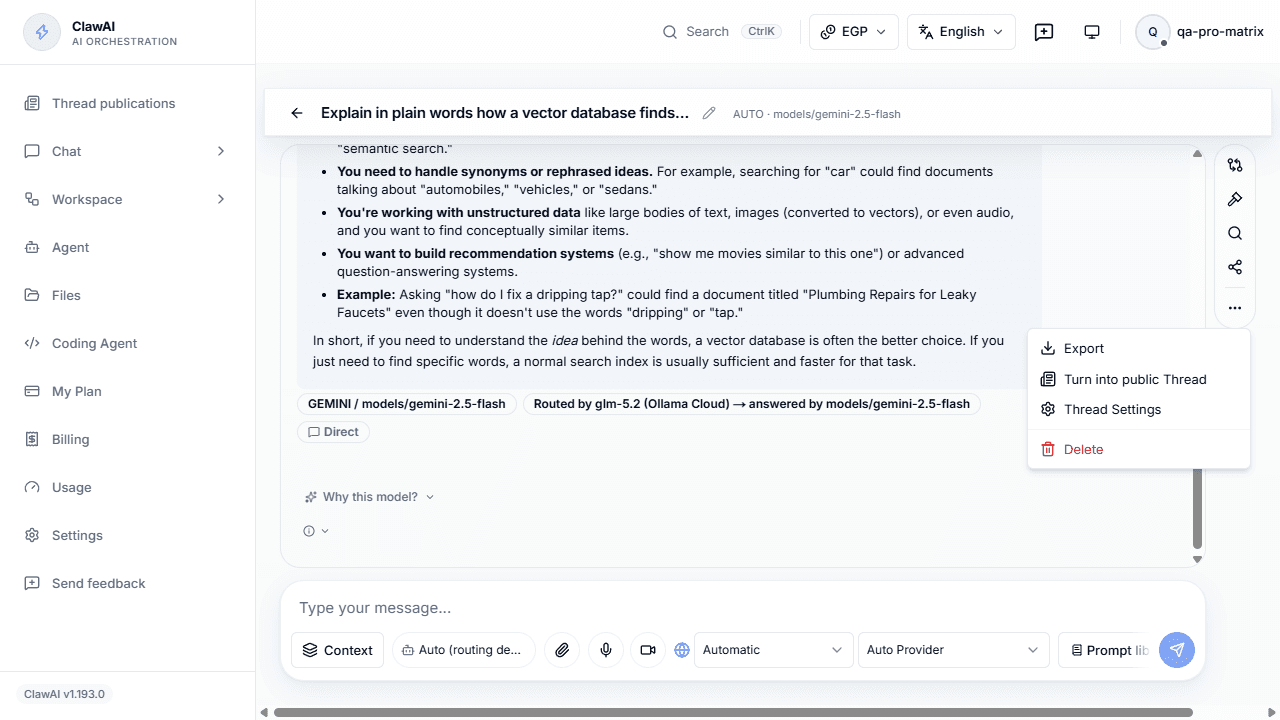
- Pick the chatOpen the chat you want to share and choose “Turn into public Thread” from the chat menu. From the Threads page you choose the source chat yourself. The conversation is frozen as a snapshot, so later edits to the chat cannot change what the Thread was built from.
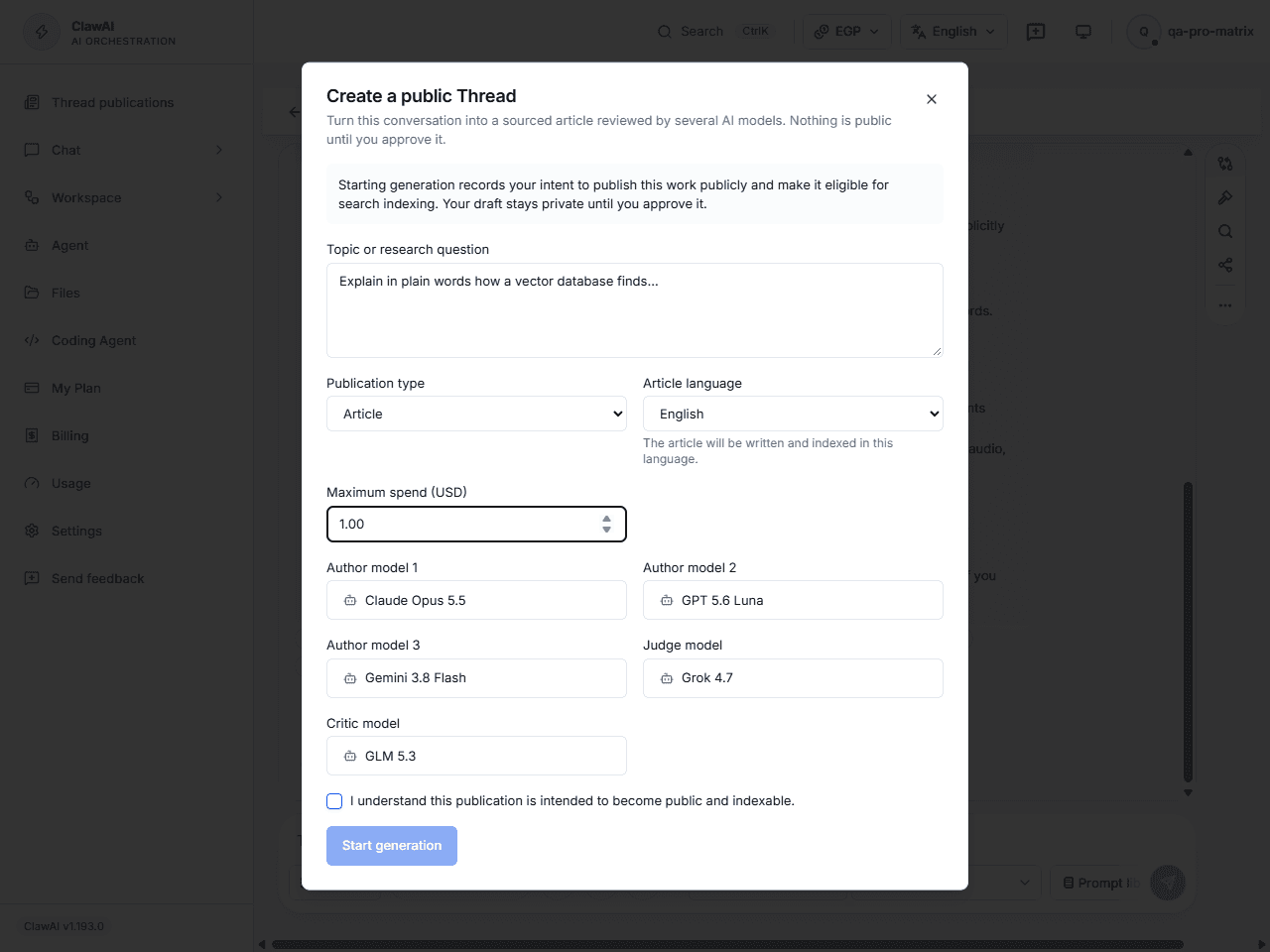
- Say what it is about and give consentWrite the topic in a sentence or two, pick the type (article, research article, guide or technical explanation) and the language, and tick the box that says you understand the result will be public. Without that consent the start button stays disabled.
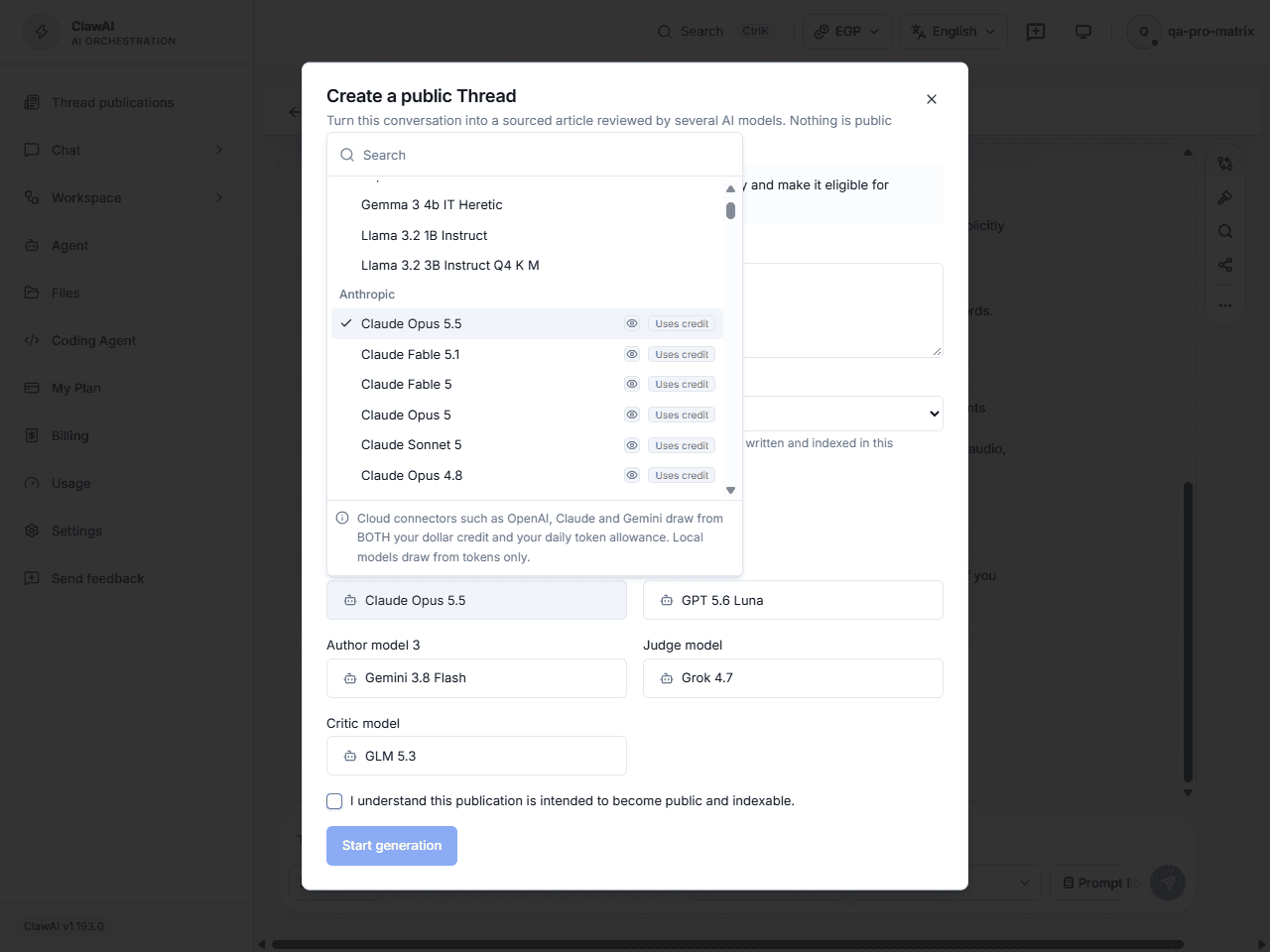
- Choose the modelsPick three to five authors, one Judge and one Critic with the same model picker you use in chat: grouped by provider, searchable, with badges for capabilities and for models that use connector credit. Different providers give you genuinely different drafts.
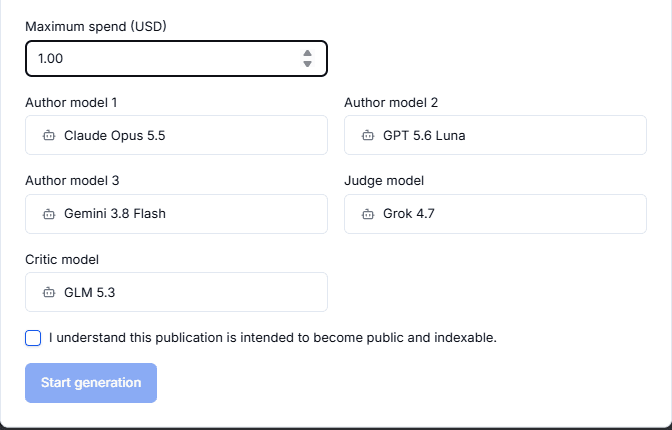
- Set a spend cap and startSet the most this Thread may spend. Every model call is checked against it before it runs, and the job stops rather than go over. You can follow the stages live and cancel at any point.
- Research, write, agree, judgeClawAI researches the topic on the live web and keeps the evidence. The authors write from that evidence, agree on one draft, and the Judge and Critic review it. A draft that fails is revised and reviewed again, for up to three rounds. If it still fails, you are told why and nothing is published.
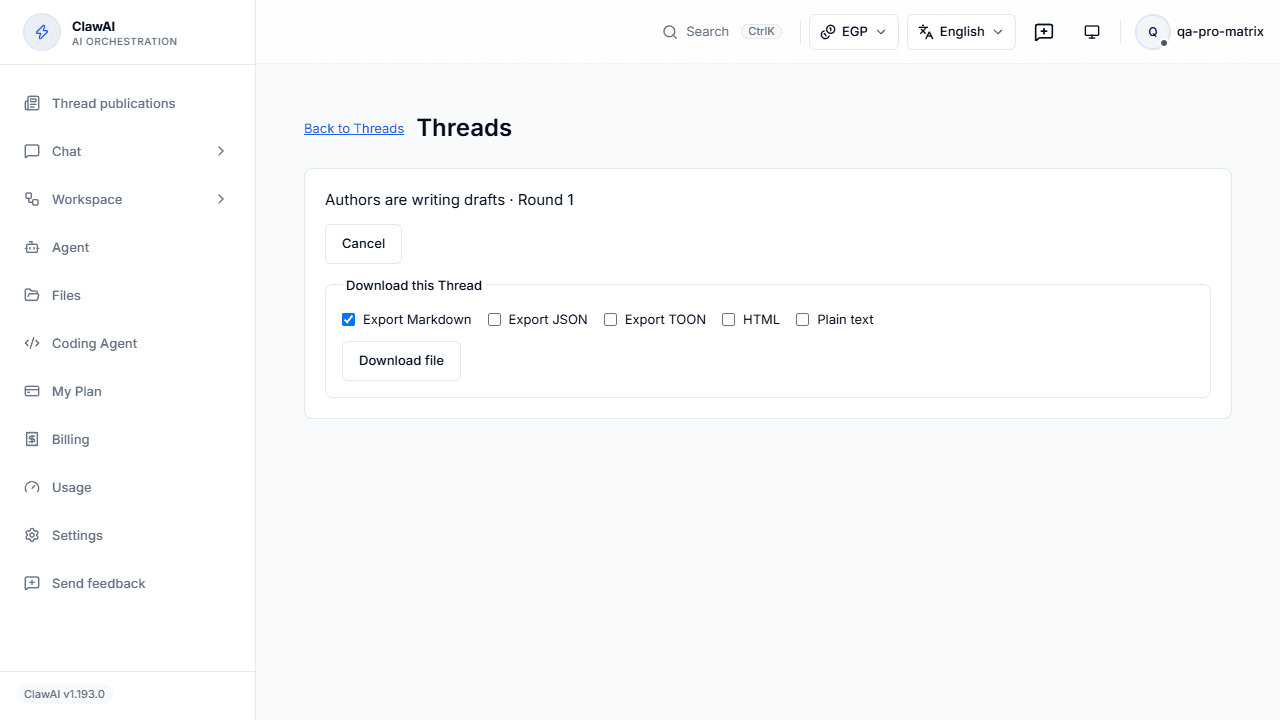
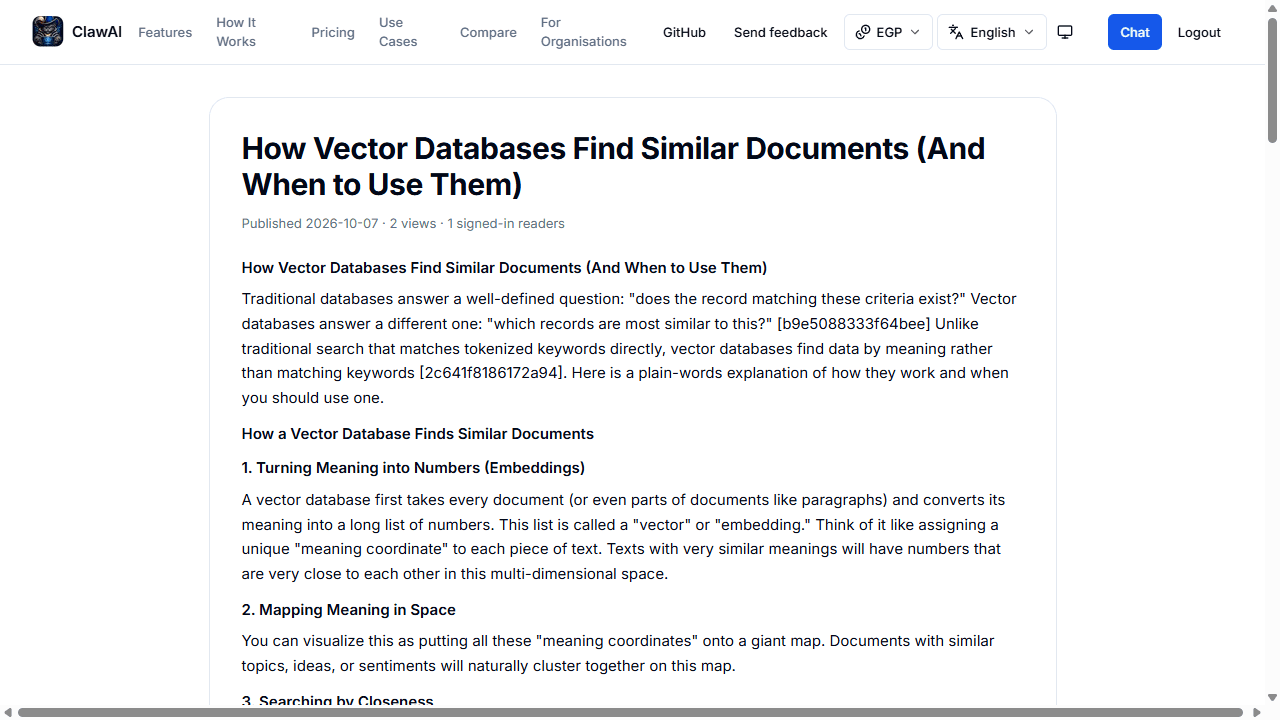
- Review, approve and publishRead the draft with its sources, ask for changes or edit it, and approve it when you are happy. Only an approved draft becomes a public page, with structured data, a source list, a reader count and room for comments and reactions. You can export it and unpublish it whenever you like.
Watch the ClawAI Threads video in three parts
Three short clips from ClawAI Threads.
ClawAI Threads video, part 1 of 3One of three short clips from ClawAI Threads.10 seconds ClawAI Threads video, part 2 of 3One of three short clips from ClawAI Threads.10 seconds ClawAI Threads video, part 3 of 3One of three short clips from ClawAI Threads.10 seconds
Safeguards that are built in, not promised
Publishing something under your account deserves more care than a chat reply. These checks run on every Thread.
- Nothing is public without your approvalA passing score from the Judge and Critic only makes a draft eligible for you to review. It never publishes anything by itself.
- Real sources onlyCitations must come from the evidence the research step collected. A draft that cites an address the research never found is rejected.
- Two independent reviewersThe Judge must score the draft at least 80 out of 100 and the Critic at least 75. Both are models you chose, so you can pick reviewers from a different provider than the authors.
- A hard spend capEach model call reserves its cost against the cap first. Unused reservations are released, and a failed or cancelled job gives its credit back.
- Your conversation stays yoursThe public page contains the article, not the chat. The chat is only the starting point and is read from a fixed snapshot.
- Reader safety and privacyReaders can comment, react, suggest changes and report a page. View counts ignore crawlers and store only anonymous keyed hashes, never an address or account.
What you get
- A public article pageA clean page with the article, its numbered sources and structured data so search engines understand it, in the language you chose.
- Discovery and feedsPublished Threads appear on the Threads hub, in the sitemap and in the RSS feeds, and leave them again the moment you unpublish.
- ExportsDownload a Thread as JSON, Markdown or TOON, the compact format that is cheap to hand to another model.
- A reader communitySigned-in readers can comment, react and suggest changes, which you can accept or decline. A view counter shows reach without tracking anyone.
What people turn into Threads
- A research chat into an explainerYou spent an hour understanding a topic with the AI. Turn it into the article you wish you had found at the start.
- A fix into a guideDebugged something tricky in a chat? Publish the working steps as a guide, with the sources that back them.
- A technical question into a write-upAsk several models, let them agree, and publish the result as a technical explanation that has been reviewed twice.
- A comparison into a postUsed Compare to see how models answer? Publish what you learned, with the research behind it.
Plans and cost
Threads is open to every plan. Free includes one Thread, Starter two a month and Plus ten a month, and higher plans include more. Creating a Thread draws on the same allowance and credit rules as the rest of ClawAI, and your spend cap is the most it can cost. Reading, commenting and reacting are free for every signed-in account.
Questions people ask
- Does my chat become public?
- No. Only the article you approve is public. The chat is used as the starting point and is never shown on the page.
- Can a Thread be published without me?
- No. Every Thread waits for your approval, however well the Judge and Critic score it. You can also unpublish at any time.
- Which models write a Thread?
- The ones you choose: three to five authors, a Judge and a Critic, from the same picker you use in chat. Using different providers gives you more varied drafts and independent review.
- What happens if the Judge or Critic rejects the draft?
- The draft is revised and reviewed again, up to three rounds. If it still does not pass, the job ends with a clear reason, any unused credit is released and nothing is published.
- How do I know the sources are real?
- Citations have to come from the evidence collected by the research step, and a draft that cites anything else is rejected. You see the numbered source list before you approve.
- How much does a Thread cost?
- You set a spend cap before it starts and the job cannot go over it. Models included in your plan do not use credit; connector-credit models draw on your credit or free allowance, and a failed or cancelled job gives its reservation back.
- Can I edit a Thread after it is published?
- Yes. An edit is reviewed again before it replaces the public version, and readers can also suggest changes that you accept or decline.
- Which languages are supported?
- Threads can be written in any of the 13 languages ClawAI supports, and the public page uses the language you pick.
Turn your next good chat into something worth sharing
Open any chat, choose “Turn into public Thread”, and see what comes back. You only publish what you approve.